Sporniket Studio
Hidtouch driver version 10.05.23
24 May 2010 — 11:45
This new version compiles on recent systems (X.Org v1.7.6). The new features are the support for the screen rotation, and a compatibility mode for some multitouch touchscreens.
Files are available on the Sourceforge project page.
- Download the driver version 10.05.18
- Download data collection tool version 9.04.04
- Download the user manual
Thanks to people who have donated, it gave me the supplemental motivation to continue.
Sporniket Nostalgie Sans typeface v9.08
02 August 2009 — 22:20
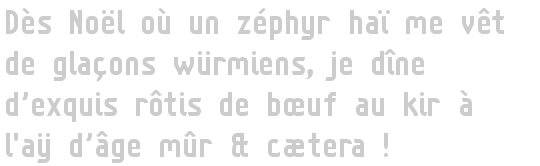
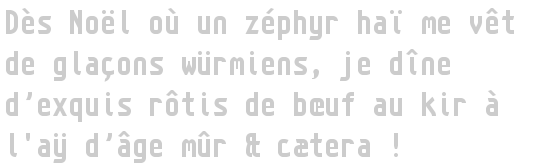
For this new version, the txpeface has a monospaced variant, suitable for programming and displaying the console.
SporniketNostalgieSans-Bold
Download SporniketNostalgieSans v9.08
SporniketNostalgieSansMono-Bold
Hidtouch driver version 9.04.04
26 May 2009 — 08:00
It has been ready for a while, but I needed some time to write a decent user manual.
This version provide a better positionning, using data collected from the four corners for calibration.
A small tool has been packaged to ease collect data.
From now files are on the Sourceforge project page.
- Download driver version 9.04.04
- Download data collection tool version 9.04.04
- Download the user manual
Thanks for the few people that gave a donation, it gave me a motivation burst to finish this version.
Almost done...
01 April 2009 — 00:00
The debugging was painful because I wanted to be too smart... but I finally got what I wanted. Even if it's not as perfect as I expected, It's quite satisfying.
Now I'm writing a better manual. And I have to package a small and crude but necessary tool to find out some of the driver setting.
If you are brave enough, all is on the SourceForge CVS server.
Hidtouch : some news and a roadmap
20 January 2009 — 09:30
I have not so much spare time in January, so the new version takes time to be written. However, I already could set up a SourceForge space, and the CVS is hosting the current version of the driver.
Roadmap
The next version of the driver will be more accurate in the cursor positionning. Then I will fix a problem when the screen is rotated using xrandr.
Then I will take time to produce a package for Ubuntu. I can support two other systems without reformating, so I plan to support debian and mandriva.
A methodology for CSS (3)
16 January 2009 — 08:55
Redefine the default HTML layout
One cause for the discrepancies of web pages layout among browsers lays in the default HTML layout that have been choosen by each browser developpment team. Thus the first thing a CSS stylesheet must do is setting this default layout explicitely : this is called "CSS reset stylesheet".
Example
This site uses the following reset stylesheet :
/*======================================================================
 *Réglages "utilisateur" pour ne pas dépendre des valeurs par défaut
 *du navigateur.
 */
address,
blockquote,
body,
caption,
center,
dd,
dir,
div,
dl,
dt,
form,
h1,
h2,
h3,
h4,
h5,
h6,
li,
menu,
ol,
p,
table,
td,
th,
ul
{
font-size: 1em;
font-family: sans-serif;
}

a
{
cursor: pointer;
}
a:link
{
color: #3364a1;
background: transparent;
text-decoration: none;
}
a:visited
{
color: #337;
background: transparent;
text-decoration: none;
}
a:active
{
color: green;
background: transparent;
text-decoration: none;
}

a:hover
{
text-decoration: underline;
}

address
{
margin: 0em 0% 0em 0%;
font: italic 1em/1em sans-serif;
}

big
{
font-size: 1em;
}

blockquote
{
margin: 0em 0% 0em 0%;
line-height: 1em;
}

body
{
margin: 0em 0% 0em 0%;
font: 1em/1em sans-serif;
background: #fff;
cursor: default;
}

button
{
cursor: auto;
}

caption
{
margin: 0em 0% 0em 0%;
line-height: 1em;
}

code
{
font-size: 1em;
font-family: monospace; /*evite de redéfinir le gras/italique, ce qui
arrive avec font*/
}

div
{
margin: 0em 0% 0em 0%;
line-height: 1em;
}

dd
{
margin: 0em 0% 0em 0%;
line-height: 1em;
}

dl
{
margin: 0em 0% 0em 0%;
}

dt
{
margin: 0em 0% 0em 0%;
line-height: 1em;
}

h1
{
margin: 0em 0% 0em 0%;
font: bold 1em/1em sans-serif;
}

h2
{
margin: 0em 0% 0em 0%;
font: bold 1em/1em sans-serif;
}

h3
{
margin: 0em 0% 0em 0%;
font: bold 1em/1em sans-serif;
}

h4
{
margin: 0em 0% 0em 0%;
font: bold 1em/1em sans-serif;
}

h5
{
margin: 0em 0% 0em 0%;
font: bold 1em/1em sans-serif;
}

h6
{
margin: 0em 0% 0em 0%;
font: bold 1em/1em sans-serif;
}

hr
{
margin: 0em 0% 0em 0%;
}

html
{
margin: 0;
background: #fff;
}

input
{
cursor: auto;
}

kbd
{
font: 1em monospace;
}

li
{
margin: 0em 0% 0em 0%;
line-height: 1em;
}

ol
{
margin: 0em 0% 0em 5%;
list-style: decimal;
}

ul ul ol ol,
ul ol ul ol,
ol ul ol ol,
ol ol ul ol,
ol ul ol,
ol ol
{
list-style: lower-alpha;
}

ol ul ol ol,
ol ol ul ol,
ul ol ol ol,
ol ol ol
{
list-style: lower-roman;
}

ol ol ol ol
{
list-style: decimal;
}

p
{
margin: 0em 0% 0em 0%;
line-height: 1em;
}

pre
{
margin: 0em 0% 0em 0%;
font: 1em/1em monospace;
}

samp
{
font: 1em monospace;
}

small
{
font-size: 1em;
}

sub
{
font-size: 1em;
}

sup
{
font-size: 1em;
}

td
{
line-height: 1em;
}

textarea
{
cursor: text;
}

th
{
font: bold 1em/1em sans-serif;
}

tt
{
font: 1em monospace;
}

ul
{
margin: 0em 0% 0em 5%;
list-style: disc ;
}

ul ul,
ol ol ul ul,
ol ul ol ul,
ul ol ol ul,
ol ul ul,
ul ol ul
{
list-style: circle;
}

ol ul ul ul,
ul ol ul ul,
ul ul ol ul,
ul ul ul
{
list-style: square;
}

ul ul ul ul
{
list-style: disc;
}

img
{
border-width:0;
}
Fix for Sporniket Nostalgie Sans typeface v8.12
24 Decembre 2008 — 00:05
There was holes in the typeface because of an error in the generation process. It has been fixed now.
Download SporniketNostalgieSans v8.12
Sporniket Nostalgie Sans typeface v8.12
22 Decembre 2008 — 08:00
An old project started 3 years ago, but I could work seriously on it only this year.
The design is freely inspired by my old Atari ST system font, without being constrained by the 8×16 pixel matrix.
This typeface supports some iso-latin encoding (ISO-8859-1 et ISO-8859-15) and some general ponctuation sign.
Download SporniketNostalgieSans v8.12

Hidtouch xorg driver version 8.11.01
01 Novembre 2008 — 10:17
This version fixe the button clic, so the touchscreen is now usable. The next feature will be the error correction of the positionning.
download xf86-input-hidtouch-8.11.01.zip
Xorg driver for HID usb touchscreens
30 Octobre 2008 — 00:38
I recently bought a laptop based on Clévo TN120R. The touchscreen is seen by Linux as a regular HID device, not an input device.
Fortunately I could write a driver that take can handle the touchscreen. There is not click event yet but the cursor moves as expected.